 Caleb Turner

For optimal comfort and performance, I suggest incorporating around 3 to 5 mm of cushioning material in a typing instrument. This thickness strikes a balance between support and responsiveness, ensuring a pleasant typing experience over prolonged use.
When selecting padding, pay attention to the type of material. Foam options provide good resilience, while silicone can offer better grip and dampening of vibrations. Testing different combinations helps identify personal preferences, which contributes significantly to overall typing efficiency.
Additionally, I recommend considering the density of the chosen material. A denser composition may deliver sturdier feedback, enhancing tactile interactions with each keystroke. Ensuring proper installation and alignment of the cushion will elevate your overall experience, allowing for a more enjoyable and productive typing session.
Understanding Key Weight in Mechanical Keyboards
The ideal actuation force for a switch usually falls between 45 to 55 centinewtons, making it comfortable for prolonged use. When selecting a switch, I always take into account how the weight will affect my typing style. A lighter key requires less force, often benefiting typists who prioritize speed, while heavier options provide tactile feedback, which can enhance accuracy for gamers.


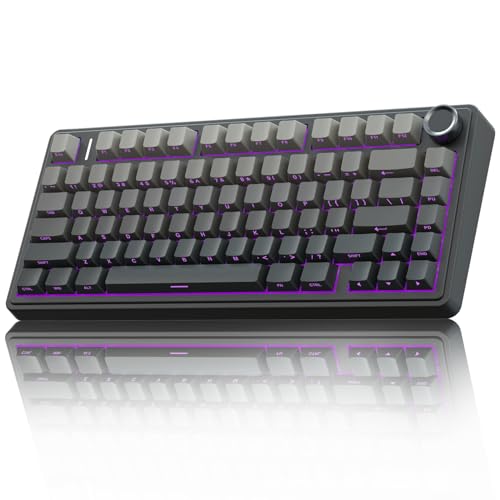
For instance, red switches typically have a linear operation with minimal resistance, appealing to those who prefer quieter presses. In contrast, blue switches, known for their tactile bump, may demand more force and can be louder due to their mechanism. Since many choose different switches according to personal preference, testing a few variations can help identify the most suitable option.
An often overlooked aspect is the keycap material. Heavier keycaps amplify the overall feeling of the switch. Thus, I find that a combination of both switch weight and keycap density influences my overall experience significantly. I suggest trying different keycap profiles alongside various switch types to discover the most satisfying setup.
Lastly, key stabilization is a factor that can’t be ignored. Stabilizers in larger keys like the spacebar or enter key can alter the perceived weight. Smooth action can mean less force required to register a press, while a sluggish stabilizer can lead to greater effort spent on larger keys. Experimenting with lubing or replacing stabilizers has helped me achieve a more consistent feel across the entire board.
Measuring Loft: Tools and Techniques
I recommend using a digital scale calibrated for precision. This ensures accurate readings when assessing the force needed to actuate switches. Place the switch onto the scale, then press it until it activates. Note the reading displayed; this will give you a reliable measurement of the actuation force.
An accurate caliper can also be employed for a more physical approach, allowing for measurement of switch height and travel distance. This technique helps in understanding how physical dimensions contribute to the feel of the switches under your fingers.
Leveraging a load cell can enhance the process, offering real-time data on the force required for switch activation. Integrating this into a DIY measurement setup can yield consistent results for those interested in deep analysis.
Experimenting with varying materials beneath the switches, such as different types of foam or keycap weight, might yield additional insights. Not just for tactile feedback but also for how it influences perceived resistance while typing.
Recording observations while testing several configurations allows for comparative analysis, making it easier to determine personal preferences and the ideal balance between feedback and effort while engaging with the interface.
Comparing Loft Grams Across Different Keyboard Brands
I found significant variation in key resistance between various manufacturers. For anyone seeking to refine their typing experience, knowing these differences can make a difference.
| Brand | Switch Type | Weight (in grams) |
|---|---|---|
| Cherry | MX Red | 45 |
| Cherry | MX Brown | 55 |
| Cherry | MX Blue | 60 |
| Kailh | Box White | 50 |
| Kailh | Box Red | 45 |
| Razer | Green | 50 |
| Razer | Yellow | 45 |
| Gateron | Red | 45 |
| Gateron | Brown | 55 |
| Logitech | GX Blue | 60 |
Its essential to match the tactile feedback and force needed to activate the keys with personal preference. A lighter touch may benefit gamers, while writers might appreciate a heavier feel. Exploring these specifications helps tailor your setup to your unique style and enhances comfort during prolonged use.
Additionally, as I tested various options, I discovered that the brand’s reputation for quality often correlates with a consistent feel across their products. Users often report that switching between different models within the same brand yields a familiar experience, which can be beneficial during transitions.
Overall, investing time in understanding these variations can lead to an informed choice that truly suits your typing or gaming requirements.
Impact of Loft on Typing Experience and Performance
Choosing the right height for key press resistance significantly affects both comfort and efficiency during typing sessions. I have found that a moderate setting enhances my speed and reduces finger fatigue. Adjusting this setting can help cater to individual preferences, particularly for prolonged usage.
My experience shows that higher resistance may lead to more deliberate typing, often beneficial for avoiding mistakes in critical documents. Conversely, lighter touch settings can facilitate rapid keystrokes suitable for casual typing or gaming. The choice between the two styles depends largely on personal technique and typing goals.
I’ve noticed that tactile feedback also changes with different resistance levels. A more pronounced response can provide a satisfying experience, improving accuracy as I receive clearer signals about key activation. This factor plays a vital role for those extensively engaged in text-heavy activities.
Experimenting with different mechanisms revealed that some models offer adjustable resistance options, allowing users to fine-tune their experience. Such flexibility is particularly useful for transitioning between tasks, whether typing code or writing creative content.
In summary, the choice of key press resistance directly influences typing efficiency and comfort. I recommend trying various resistance settings to find the ideal match for your unique typing style. This exploration not only enhances performance but also makes for a more enjoyable experience overall.
Finding the Right Loft for Your Typing Style
Choosing the optimal height for your typing approach can significantly enhance your comfort and efficiency. I recommend starting with a baseline setting of around 3 to 4 millimeters. This height typically accommodates various styles, balancing feedback and finger fatigue.
Consider these factors when determining the best fit for you:
- Finger Position: Keep your fingers properly aligned to reduce strain. Position them above the keys without excessive elevation.
- Typing Speed: Experiment with slight adjustments. A lower profile may improve speed, while a taller profile could offer better tactile response.
- Key Shape: Curved keycaps may require different heights compared to flat ones. Test various shapes to see which aligns best with your natural motion.
- Material and Finish: Some materials provide more grip. Experiment with different textures to find what feels right and whether it complements a specific height.
After testing various configurations, I found my sweet spot at 4 millimeters. During this phase, I noted my typing speed increased, and the level of fatigue decreased significantly, leading to a more enjoyable experience.
Continuously adapt your settings based on feedback from your hands and how you engage with your device. Ultimately, it’s about striking a balance that supports your unique typing style while maximizing both performance and comfort.
Adjusting Loft: Customization Options for Keyboards
To achieve optimal performance, I personally explore several customization features that allow me to adjust the height and feel of the switches. Modifying the travel distance and actuation point has a direct influence on my typing efficiency.
One approach I often use is experimenting with various switch types. Different switches offer specific actuation forces and travel distances. For instance, linear switches typically provide smoother keystrokes with lower resistance, while tactile switches present noticeable feedback at the actuation point. Choosing the right switch can significantly enhance my overall experience.
I also pay attention to keycap profile, as this can impact the perceived elevation and ergonomics. Profiles like SA or DSA provide distinct heights and shapes that alter finger placement and comfort during prolonged use.
For more fine-tuning, I rely on modifications such as lubing switches, which can reduce friction and create a smoother keystroke. Adding foam or silicone dampening materials within the case minimizes noise and vibrations, yielding a more pleasant auditory feedback.
The ability to personalize backlighting settings also plays a significant role in my setup. Aesthetic adjustments can enhance my workspace environment, making it visually appealing while improving visibility during late-night sessions.
Using software utilities for remapping keys allows me to hone my control over the keyboard layout. Custom shortcuts enhance my productivity, tailoring the device to my specific needs and workflows.
In sum, adjusting height and feel through various customization options creates a more tailored typing experience that can cater to my individual preferences and enhance overall performance.
FAQ:
How do you determine the loft weight in a keyboard?
Determining the loft weight in a keyboard typically involves measuring the total weight of the keyboard components and assessing the type of switches used. Specifically, the loft in this context refers to the amount of space or height between the key and the base, which is influenced by keycap design and switch type. Using a kitchen scale, you can weigh the assembled keyboard, and by subtracting the weight of the individual components, such as the case and any additional weights, you can estimate the loft. Also, researching the specifications for the specific key switches can provide information about their height and weight characteristics.
Is there a standard loft weight for mechanical keyboards?
No, there isn’t a universal standard loft weight for mechanical keyboards as loft can vary significantly among different brands and models. Generally, mechanical keyboard loft weight is determined by factors like the type of switches used, the design of the keycaps, and the overall build quality. For instance, keyboards with thicker keycaps may have a higher loft weight due to the added material compared to those with standard keycaps. A good way to gauge loft weight is to check detailed product specifications provided by manufacturers, which often highlight the dimensions and weight of the key components.
What are the implications of having a high or low loft weight in a keyboard?
The implications of having a high or low loft weight in a keyboard can be significant for typing experience and usability. A higher loft may enhance tactile feedback, making it feel more responsive to the user. However, it may also require more effort to depress keys fully, which could be tiring for long typing sessions. Conversely, a lower loft provides a flatter profile, which can lead to a more comfortable typing experience, especially for users who prefer low-profile designs. Ultimately, the best loft weight varies based on individual preferences and typing styles, so users should consider testing different keyboards to find their optimal fit.
Can modifying a keyboard’s loft weight improve performance?
Yes, modifying a keyboard’s loft weight can potentially improve performance, particularly for gamers or those who type extensively. By customizing the switches, keycap material, or even adding weight to the keyboard case, users can tailor the feel and responsiveness of the keyboard to their liking. For instance, replacing standard keycaps with heavier models or adjusting the switch type can lead to a distinct change in the feel and sound of key presses, enhancing overall user experience. However, such modifications should be approached carefully, as they may also alter the intended characteristics of the keyboard.
What resources are available for learning more about keyboard loft weights?
There are several resources available for those interested in learning more about keyboard loft weights. Online forums and communities dedicated to mechanical keyboards, such as Reddit’s r/MechanicalKeyboards or specialized websites, are great places to start. These platforms often feature discussions on different keyboard models, user reviews, and technical specifications. Additionally, keyboard enthusiast blogs and YouTube channels offer in-depth analyses, unboxings, and comparisons that can shed light on the impact of loft weight on user experience. For those looking for technical data, websites of keyboard manufacturers often provide detailed specifications about their products.