
 Caleb Turner

Begin by selecting a well-lit space, ideally with ample natural light. This soft illumination will reduce harsh shadows and enhance the texture of your items. Position your pieces a few feet away from walls to prevent unwanted reflections.
Utilize a tripod to ensure stability and consistency in your shots. This will allow for longer exposure times, which can help highlight intricate details. Additionally, adjust your camera settings to maximize clarity; a lower ISO will minimize noise, while a wider aperture can create a pleasing depth of field.
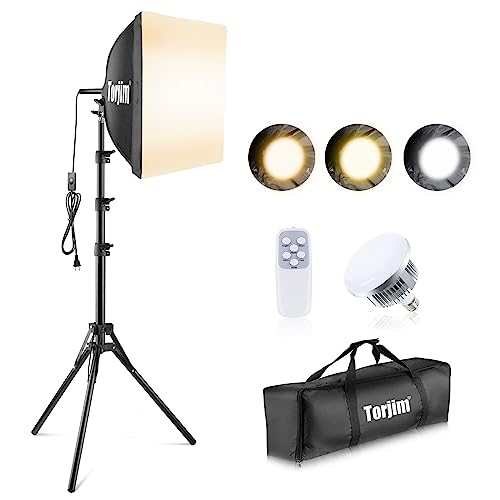
For an immaculate portrayal, incorporate a seamless light source. Softboxes or diffused lamps can help disperse light evenly across the surface. Test various angles to find the most flattering viewpoint, and don’t hesitate to move around until the composition feels balanced.


Editing software will further refine your images. Adjust brightness and contrast for a polished finish, and remove any blemishes or distractions that might detract from the item itself. A simple, yet effective editing process enhances the overall professionalism of your visuals.
Tips for Capturing Items Against a Bright Canvas
Utilize natural light as your primary source. Position items near large windows, allowing soft sunlight to illuminate surfaces without harsh shadows.
To enhance clarity, opt for a tripod. This stabilizes the camera and avoids blurriness from hand movement, especially in lower light conditions.
Setup Instructions
- Choose a smooth, uniform surface. A seamless backdrop creates a clean appearance.
- Ensure the area is free of clutter to avoid distractions from the main subject.
- Arrange the object at an angle, showcasing unique features while allowing symmetry.
Post-Processing Advice
- Adjust brightness and contrast to highlight details.
- Utilize background removal tools to enhance the clean look.
- Consider cropping the image to center the focus, eliminating unnecessary space.
Choosing the Right Lighting for Your Setup
For optimal results, I recommend using soft, diffused lighting to illuminate the subject. This can be achieved with softboxes or natural light filtered through sheer curtains. The goal is to minimize harsh shadows while highlighting the details of the item.
Utilizing Natural Light
When utilizing daylight, position the piece near a window. Morning or late afternoon light is often best due to its softer quality. I adjust the angle to avoid direct sunlight, which can create unwanted glare. If the light is too bright, using sheer white curtains helps diffuse it effectively.
Artificial Lighting Techniques
If opting for artificial sources, I often use two or three softboxes. These should be placed at different angles to the subject, ensuring even coverage. Using a light meter to gauge exposure is beneficial, as it allows precise adjustment for clarity and contrast.
To prevent reflections, I might include black cards or reflectors to control the light. Utilizing a neutral light temperature around 5000K to 6000K maintains color accuracy during the shoot. Consider experimenting with positioning until I achieve the desired look.
Selecting the Best White Background Material
For optimal results, I recommend using seamless paper as it provides a smooth, consistent surface free from texture interference. Rolls of white seamless paper, which are widely available in photography supply stores, can be easily hung or mounted, ensuring a clean look without wrinkles.
Another excellent option is a dedicated photography backdrop. Look for fabric materials like muslin or vinyl; they offer versatility and can be washed or wiped down as needed. If I choose fabric, I ensure it’s heavily weighted to prevent movement during the shoot.
Consideration of Reflectivity
Reflective materials can cause unwanted glare and inaccurate exposure; thus, I avoid shiny surfaces. Matte finishes help to diffuse light efficiently and minimize reflections, ensuring the subject stands out clearly. If I’m unsure, I always conduct test shots to evaluate the effects.
Size and Space
Choosing the right dimensions for my backdrop is vital. I select a material large enough to encompass the entire subject without visible edges. A backdrop extending beyond the main item creates a seamless transition, making retouching easier later. I find that an extra wide roll can reduce the need for stitching or multiple seams.
Overall, my choice centers around durability and the ability to maintain a professional appearance. Evaluating the material’s resilience against wear and ensuring it can withstand regular use allows me to maintain consistent results in each session.
Arranging Furniture for Optimal Composition
I focus on the rule of thirds when positioning items. Placing key elements along these imaginary lines creates visual interest. It’s crucial to avoid centering everything; an off-center arrangement often feels more dynamic.
To achieve balance, I arrange pieces of varying heights so that the overall scene does not appear lopsided. For instance, if there’s a tall bookshelf or cabinet on one side, I’ll complement it with a medium-height console or chair on the opposite side.
Layering also enhances depth in the frame. I might use different materials, like wood and metal, to give texture. I ensure the closest objects have some overlap, which helps create a three-dimensional feel.
I pay attention to negative space, ensuring there’s enough of it to prevent clutter. Leaving areas empty allows the viewer to focus on the main subjects without distractions.
Color contrast is another important factor. When working with a light palette, I’ll introduce darker elements, like a dark wood table or a colorful accent pillow, to break the monotony and attract the eye.
Finally, I often rearrange pieces multiple times until the composition feels just right. I take test shots from different angles to find the most flattering perspective that showcases each element effectively.
Camera Settings for Crisp Images
Set the aperture between f/8 and f/11 to achieve a greater depth of field, ensuring all elements are in sharp focus. This setting will help maintain clarity across the entire piece, avoiding blurred edges.
Adjust the ISO to a low value, ideally around 100, to minimize noise and graininess in your captures. A lower ISO also contributes to finer details in the surface textures of the item.
Utilize a shutter speed of 1/125 seconds or faster to freeze motion, particularly when working in handheld mode. This will prevent any blurriness caused by camera shake during the shooting process.
Switch to RAW format for better post-processing flexibility, allowing for enhanced adjustments in exposure, contrast, and color correction. This format preserves the most data, facilitating finer edits.
Utilize manual mode for full control over settings, enabling precise adjustments as lighting changes, and allowing for effective exposure metering based on the setup conditions.
Enable grid lines on the display to assist in aligning your subject according to the rule of thirds, which enhances overall composition and ensures even spacing around the item.
Using Tripods to Stabilize Shots
Investing in a sturdy tripod is non-negotiable for achieving clarity in images. I always select a model that allows for adjustable height and has a quick-release plate for easy camera mounting.
Positioning the tripod on a flat, stable surface is key. Make sure to lock the legs in place to prevent any movement during shooting. I prefer models that have rubber feet to enhance grip on various surfaces.
For added stability, especially in low-light situations, I utilize a remote shutter release or the camera’s timer function. This minimizes any accidental shake caused by pressing the shutter button.
When setting up my gear, I adjust the tripod height to align the camera lens with the focal point of the subject. This ensures proper composition and reduces the chances of awkward angles.
Additionally, incorporating a tripod collar can be beneficial if I’m working with larger pieces or need to rotate the camera without adjusting the entire tripod setup.
During the shoot, I always check for any unwanted movement, particularly if I’m working in a busy environment. I sometimes weigh down the tripod using a bag or sandbag for extra stability.
The following table outlines key features to consider when selecting a tripod:
| Feature | Description |
|---|---|
| Material | Choose between aluminum for durability or carbon fiber for lightweight portability. |
| Weight Capacity | Ensure it can support your camera and any additional accessories. |
| Height Range | Select a model that can extend to your preferred shooting height. |
| Leg Locks | Opt for twist locks or lever locks based on your preference for speed and stability. |
| Pan Head | Consider a fluid head for smooth panning while adjusting angles. |
Post-Processing Tips for a Clean Background
First, utilize the “Magic Wand” or “Quick Selection” tool in your editing software to isolate the item. Ensuring a precise selection prevents any white edges around the subject.
Next, adjust the levels and brightness. Often, the backdrop is slightly gray, which can be corrected by increasing brightness while pulling the black point towards the right until the background appears pure and bright.
Consider applying a Gaussian blur subtly to the background. This adds depth, making the main subject stand out sharply.
If you notice any imperfections or unevenness in the backdrop, use healing or cloning tools to smooth out these areas. This technique can effectively erase distractions and make the background seamless.
Enhance color balance for a natural look. Sometimes, the automatic adjustments can skew the colors. Fine-tuning this ensures a more realistic appearance, especially for neutrals.
Lastly, save your files in a lossless format to maintain high quality, allowing for future adjustments without degradation.
Avoiding Reflections and Shadows
Control reflections and shadows to achieve a polished look in your images. Follow these strategies:
Lighting Control
- Use soft, diffused lighting. Softboxes or light tents minimize glare.
- Position lights at an angle to eliminate direct reflections on surfaces.
- Employ multiple light sources to reduce harsh shadows from single-direction lighting.
Surface Selection
- Opt for non-reflective materials for pricey items; matte finishes help in reducing unwanted glare.
- Use a low table under glossy items to block reflections from the camera angle.
Experiment with angles. Adjust your shooting position until reflections disappear and shadows are minimal. Check your camera settings for optimal exposure, which can help in diminishing unflattering shadows and reflections.
Consider using a polarizing filter. This tool effectively reduces glare on reflective surfaces and enhances image clarity. Test different angles to find the best effect.
Tweak the environment. A clutter-free, neutral setting helps in focusing on your main subject while avoiding distractions like unwanted reflections from surrounding objects.
Review your results. Analyze captured images for reflections and shadows, making necessary adjustments in subsequent attempts.
Best Practices for Consistent Shots
Maintain the same distance from the subject for every image. This consistency ensures uniformity in scale and perspective.
Establish a specific angle for your shots, such as straight-on or slightly above. Utilize this angle across all captures to create a cohesive visual series.
Utilize a calibrated color reference card in each photograph to guarantee accurate colors during editing. This tool aids in maintaining color fidelity throughout the process.
Set a fixed aperture setting to achieve a consistent depth of field. Doing so will enable you to focus uniformly across different pieces, enhancing clarity in each picture.
Keep your camera settings unchanged for ISO and shutter speed unless necessary. Variations can lead to differing exposures, which disrupts the overall look.
Conduct frequent tests before the shoot to fine-tune adjustments and see what works best. This practice will eliminate surprises when you’re in the middle of a session.
Shooting in RAW format ensures more flexibility during post-processing. Lossless compression preserves the quality well, allowing for adjustments without degradation.
Develop a workflow for post-processing that includes similar edits for each image to streamline production and maintain a unified aesthetic. This can include lighting corrections and color adjustments.
Regularly clean your lens and sensor to prevent dust spots from appearing in your images. A clean working environment also minimizes the risk of contaminants on the subject itself.


