Caleb Turner
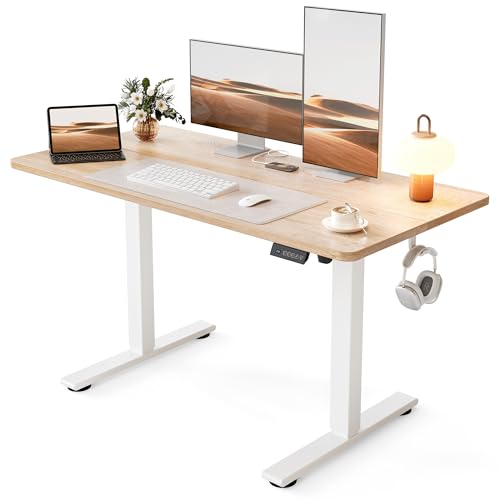
Begin with a clear separation of tasks; designate areas specifically for focused work, collaboration, and relaxation. This division not only enhances productivity but also keeps distractions at bay. A well-defined layout allows for seamless transitions between different activities throughout the day.
Consider the flow of movement within the space. Arrange desks and seating to promote easy access to shared resources such as printers or communal areas. Ensure that pathways are unobstructed to facilitate smooth interactions among team members, reducing time spent navigating around obstacles.
Incorporate ergonomic principles into the setup. Position chairs, desks, and screens at appropriate heights to reduce strain and fatigue. Adjustable options can greatly enhance comfort and adapt to individual preferences, promoting well-being and sustained focus during long hours of work.


Utilize storage solutions wisely; shelves and cabinets should be easily accessible yet organized to minimize clutter. Transparent containers or labeled files can enhance visibility and streamline the retrieval of necessary materials, keeping the workspace tidy and efficient.
Lastly, enhance the aesthetic of the environment. Introducing plants or artwork can create an inviting atmosphere, influencing mood and motivation positively. A well-curated space reflects professionalism and can greatly impact overall morale within the team.
Arranging Elements in a Workspace
Positioning desks in a way that allows for natural light exposure increases productivity and improves mood. Placing workstations near windows, without causing glare on screens, can enhance the overall ambiance.
Utilizing Vertical Space
Incorporating shelving units on walls frees up floor area, making movement easier. Leveraging organizers and storage solutions vertically helps keep items accessible while minimizing clutter on surfaces.
Creating Distinct Zones
Designate areas for specific tasks. Establishing a quiet zone for focused work, a collaborative space for meetings, and a break area can enhance workflow. Using rugs or partitions helps in visually dividing these sections while maintaining an open feel.
Assess Your Space and Define Workflow
Begin by measuring the dimensions of the area. Create a scaled floor plan to visualize placement. Consider the entry points, windows, and any fixed features like columns or electrical outlets that may influence arrangement.
Identify Your Activity Zones
- Designate a section for focused work with minimal distractions.
- Allocate an area for collaboration, equipped with a meeting table and comfortable seating.
- Establish a storage zone for supplies and documents, ensuring easy access while keeping clutter at bay.
Analyze Workflow
Observe daily tasks and movement patterns. Streamline processes by positioning desks and workstations to minimize unnecessary travel. Keep frequently used items within arm’s reach, reducing interruptions and enhancing productivity. Use zones to group related activities, making transitions smoother.
Regularly reassess the setup to accommodate changing needs or team growth, ensuring continued effectiveness and comfort in the designed layout.
Select the Right Furniture for Your Needs
I prioritize functionality over aesthetics. A well-ergonomic chair is indispensable for long working hours, ensuring comfort and support, which enhances productivity. I recommend adjustable models that cater to individual body types.
Desks should accommodate various tasks. I rarely opt for traditional fixed options; instead, I choose height-adjustable workstations that allow for both sitting and standing, promoting movement and reducing fatigue.
Storage solutions play a pivotal role. I favor modular shelving units that can adapt to different needs and maintain order. Open shelving allows easy access to frequently used items, while closed cabinets can conceal less attractive supplies.
Technology integration is critical. I select desks with cable management features to keep cords organized. Additionally, choosing multi-functional pieces, such as a table that can double as a meeting space, optimizes the area.
Color and material choices influence ambiance. I gravitate towards lighter shades for smaller settings, creating an illusion of spaciousness. Durable materials that withstand daily wear while remaining aesthetically pleasing are my go-to.
Lastly, consider personal style. Office decor should reflect individual personality while maintaining a professional atmosphere. I curate accessories and art pieces that inspire creativity and foster a positive vibe.
Plan Your Office Layout for Collaboration
I prioritize creating spaces that enhance teamwork and communication. Using an open layout can encourage spontaneous discussions and brainstorming sessions. This arrangement also allows team members to easily engage with each other, breaking down barriers often found in traditional setups.
I recommend strategically placing shared resources, like printers or whiteboards, in communal areas to promote interaction. This can create natural gathering spots, making it easy for colleagues to collaborate on projects or share ideas in an informal setting.
Choosing modular seating options can add flexibility. These can be rearranged based on team size or the nature of the task. For example, a circular or semicircular seating arrangement can facilitate dialogue, unlike a typical row setup.
Incorporating designated breakout zones is another approach. I find that these informal spaces encourage creativity, allowing teams to step away from their desks, which can spark fresh ideas. Soft seating and casual ambiance can make these areas inviting.
Understanding the importance of sound distribution in collaboration is essential. Acoustic panels or plants can help manage noise levels, ensuring that conversations are private yet collaborative environments remain vibrant.
| Element | Purpose |
|---|---|
| Open Layout | Encourages spontaneous interaction |
| Shared Resources | Creates gathering spots for team collaboration |
| Modular Seating | Allows flexibility in arrangement for various activities |
| Breakout Zones | Fosters creativity and informal brainstorming |
| Acoustic Panels | Reduces noise distractions while enhancing privacy |
By implementing these strategies, I create a dynamic workspace that promotes collaboration and supports the innovative spirit of the team. Effective layout choices can significantly impact workflow and team dynamics, leading to improved productivity and satisfaction.
Optimize Storage Solutions to Reduce Clutter
Incorporate multi-functional storage units that blend seamlessly into existing arrangements. Bookshelves can double as dividers, creating separate zones while holding supplies. Utilize vertical space by adding wall-mounted shelves. This approach maximizes area while keeping essentials within reach.
Utilize Clear Containers
Clear bins assist in identifying contents easily, minimizing time spent searching for items. Label each container specifically to streamline retrieval processes. This practice keeps everything organized and fosters a tidier appearance.
Introduce Mobile Carts
Mobile carts provide flexibility, allowing for easy repositioning based on current needs. They can house various items such as stationery or technology and can be moved to different locations during collaborative tasks. This adaptability significantly reduces clutter without requiring a permanent setup.
Incorporate Ergonomics for Comfort and Health
Position monitors at eye level to prevent neck strain; use adjustable stands if needed. Seat height should allow feet to rest flat, maintaining knee alignment with hips. Invest in an ergonomic chair that supports spinal curvature, reducing back discomfort during long hours.
Set keyboard height so elbows remain close to body, facilitating a relaxed wrist position. A wrist rest can provide additional support. Opt for a mouse that fits comfortably in hand, minimizing wrist movement.
Incorporate standing desks to alternate positions throughout the day, combating fatigue. Ensure that standing workstations are adjusted so screens remain at eye level. Consider anti-fatigue mats to enhance comfort while standing.
Make use of elbow or arm rests to alleviate shoulder tension. Regular breaks to stretch and move can enhance circulation and focus. Schedule reminders to stand, stretch, or walk around every hour to maintain productivity.
Install task lighting to reduce eye strain, allowing a well-lit workspace that minimizes glare. Choose wall colors that promote calmness and concentration, avoiding overly bright tones that may distract.
Adjust and Redesign Regularly for Best Results
Conduct regular reviews of the arrangement in the workspace to identify inefficiencies or areas needing improvement. Set a schedule–monthly or quarterly–to evaluate the effectiveness of the current setup. Invite feedback from team members on their workflow experiences.
Be open to reconfiguring sections as needs evolve. For example, if collaboration increases, consider adjusting seating arrangements to enhance interaction. Alternatively, if individual concentration is paramount, separate workstations may be necessary.
Keep track of trends in design and functionality that might enhance productivity. Stay informed about new products or innovations that can streamline processes. Mixing in flexible elements, like movable partitions or adjustable desks, permits quick adaptations.
Use visual representations, such as diagrams, to map out potential changes before implementation. This approach minimizes disruptions and allows for clearer communication of adjustments to the team.
Document the changes made and their impacts on performance. Assess whether specific alterations led to improvements in workflow or morale. This data will guide future decisions, ensuring continuous enhancement of the working environment.